Help
Curated Answers let you override or guide the AI with precise, approved content. When a visitor asks something that matches the intent of a curated question, the AI will use your answer or your chosen web page instead of generating a response from search results.
This guide explains how to use the Edit Curated Answers screen in the Airgentic admin console . For a high-level overview of the feature, see Human Override on the Airgentic platform.
Why use Curated Answers?
Even the best conversational AI has limits. Curated Answers help when:
- The answer isn’t in your current content (e.g. opening hours, a named contact).
- Several sources conflict and you want one authoritative answer.
- Sensitive or legal wording must be exact (returns policy, disclaimers).
- You need to deflect or handle certain topics in a specific way.
With Curated Answers you put humans in the loop: your team decides the exact message or the single source the AI should use for that intent.
Two override modes
Each curated answer uses one of these:
| Mode | What you provide | When to use it |
|---|---|---|
| Verbatim answer | The exact text (or HTML) the agent will show. | When you want full control over the wording (policy, contact details, one-off facts). |
| Pinned URL | The web address of the page the AI must use for that question. | When the answer lives on a specific page and you want the AI to always cite that page (e.g. contact page, form, policy PDF). |
You cannot set both an answer and a URL for the same question—you must choose one. The admin screen will warn you if both are filled in.
Opening the Edit Curated Answers screen
- Log in to the Airgentic admin console (or your organisation’s admin URL).
- Choose the service (AI chatbot) you want to edit curations for (e.g. from the account switcher or service menu).
- Go to Edit Curated Answers (or Curated Answers in the menu). The URL is typically
/edit_curations?service=<service_id>.
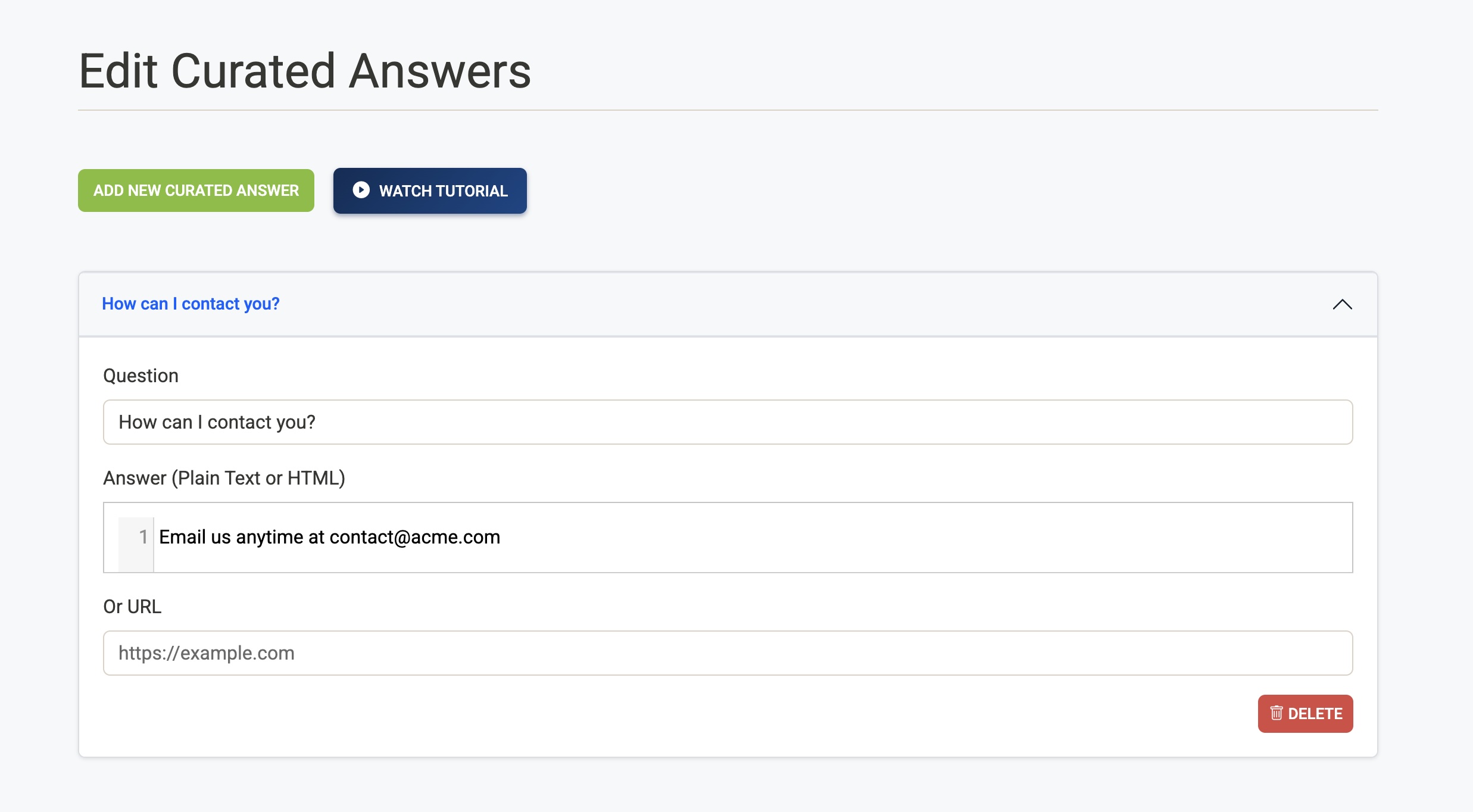
You’ll see a list of existing curated answers and buttons to add new ones or watch a short tutorial.
The Edit Curated Answers screen
- Add New Curated Answer — Creates a new entry. You’ll be asked for a question and either an answer or a URL.
- Watch Tutorial — Opens a short video on how to use the screen.
- List of curated answers — Each row is one override. Click a row to expand it and edit the Question, Answer, or Or URL fields. Use Delete to remove an override.
Fields in each curated answer
- Question — The intent or question you want to override. You don’t have to match the exact words users type; the system matches on intent (e.g. “opening hours”, “fees”, “CEO name”). A clear, representative question helps.
- Answer — The exact response the agent will show. You can use plain text or HTML (e.g. paragraphs, lists, links). This is the “verbatim answer” mode.
- Or URL — Alternatively, the full web address of the one page the AI must use for this intent. The AI will use that page as the source and cite it. This is the “pinned URL” mode.
Rules:
- You must provide either an Answer or a URL, not both.
- The question is required; the system will not save an entry without it.
After editing, click Save (or use the sticky save bar if it appears). Changes are saved to your configuration and re-indexed in the background; they usually take effect within a short time.
Verbatim answers: using HTML
When you choose the Answer field (verbatim mode), you can use simple HTML to structure the response, for example:
- Paragraphs:
<p>Your text here.</p> - Bold:
<strong>Important</strong> - Links:
<a href="https://example.com/page">Link text</a> - Lists:
<ul><li>Item 1</li><li>Item 2</li></ul>or<ol>...</ol>
The Edit Curated Answers page includes an HTML Quick Reference section at the bottom with common tags. Keep formatting simple so the answer stays readable in the chat.
Pinned URL: when to use it
Use Or URL when:
- The answer is already on a specific page (contact details, form, policy document).
- You want the AI to always point users to that page and use it as the single source.
The AI will use that URL as the authoritative source for that intent and cite it in the response. You don’t write the answer text yourself; the system uses the content at that address.
Tips and good practice
- Review Insights first — Use conversational insights to spot questions that get poor or inconsistent answers, then add a curated answer for that intent.
- One intent per row — Use one curated answer per distinct intent (e.g. “opening hours” vs “fees”) so matching stays clear.
- Keep questions representative — Phrase the question as users might ask it; the system matches by intent, not exact wording.
- Save and confirm — After saving, test the chatbot with a similar question to confirm the override appears as expected.
Governance and precedence
- Curated Answers take priority over normal AI-generated answers when the user’s question matches the intent.
- When you use a pinned URL, the AI still shows a citation to that page.
- Changes are saved and versioned in your configuration; your team can see what was added or updated.
For more on how Human Override fits into the platform, see Human Override | Airgentic.